Security / Field note
TLS 1.3 handshake: a clear step-by-step guide
Learn how a browser and server agree on TLS 1.3, check identity, create shared keys, and protect HTTPS data.
When you open a secure website, your browser and the website must agree on how to protect their connection. They do this with a TLS handshake. It happens before normal web data, such as a page request, can travel safely between them.
People often say “SSL handshake” or “SSL certificate.” SSL is an older protocol and should not be used today. Modern HTTPS uses TLS, which replaced SSL. This guide explains a common full TLS 1.3 handshake with a server certificate. Other handshakes, such as a resumed session or a client certificate login, can use a different flow.
The short version
The handshake has three jobs:
- Agree on settings. The browser and server choose a TLS version and cryptographic options that both support.
- Check the server. The browser checks the server’s certificate and its proof that it owns the matching private key.
- Create shared keys. Both sides calculate secret keys. They use these keys to protect later data.
The browser does not send the shared secret over the network. Each side calculates it for itself from temporary key information.
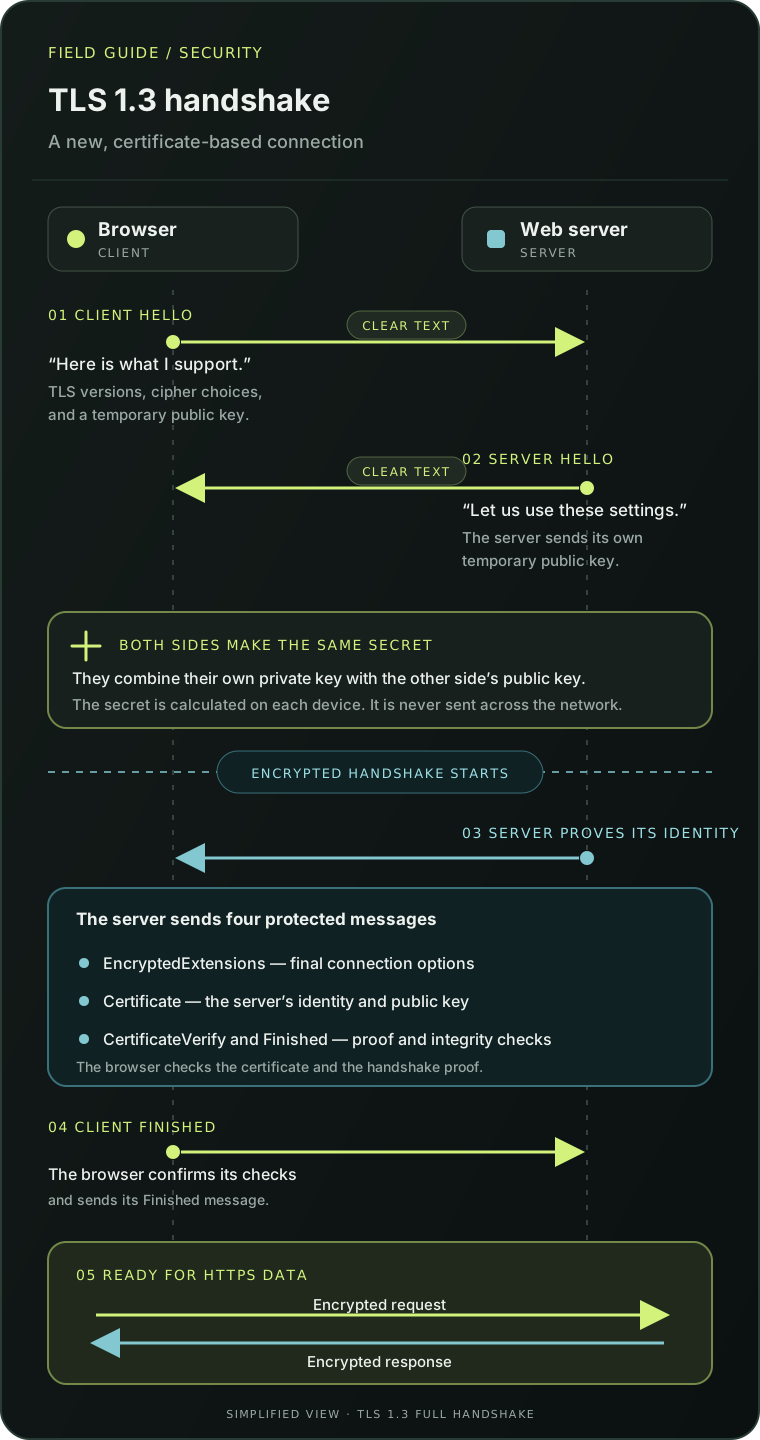
Step 1: The browser sends ClientHello
The browser starts with a message called ClientHello. It tells the server which TLS versions and cryptographic options it supports. It also includes a temporary public key share for the key exchange.
The message can include the site name the browser wants to reach. This helps one server choose the correct site when it hosts many websites. In many connections, this name is visible to devices on the network. Encrypted Client Hello (ECH) can protect it when both the browser and server support and use ECH.
Think of this step as the browser saying: “Here are the secure methods I can use. Which one can we both use?”
Step 2: The server answers with ServerHello
The server chooses a supported version and a set of cryptographic options. In this guide, both sides agree on TLS 1.3. The server also sends its own temporary public key share.
Now the browser and server can calculate the same shared secret. The browser combines the server’s public key share with its own temporary private key. The server does the matching calculation with the browser’s public key share and its own temporary private key.
The result is the same on both sides, but the private keys and shared secret do not cross the network. TLS uses this secret to derive keys for the handshake. After ServerHello, the rest of the TLS 1.3 handshake is encrypted.
Step 3: The server proves who it is
The server sends a short flight of protected handshake messages. The main messages are:
EncryptedExtensions: extra settings for this connection.Certificate: the server’s certificate, often followed by certificates that link it to a trusted authority.CertificateVerify: a digital signature made with the private key that matches the certificate. It proves that the server controls that key and ties its proof to this handshake.Finished: a check that the handshake messages have not been changed and that the server has the right handshake keys.
The certificate contains a public key and information about the server’s identity. It is not the session key, and the browser does not use it to encrypt the page data.
Step 4: The browser checks the certificate
The browser checks whether it can build a trusted path from the server’s certificate to a certificate authority in its trust store. It also checks that the certificate is valid for the requested site name and is within its validity dates. Browser and operating-system policy can add other checks.
The browser then verifies the server’s CertificateVerify signature and Finished message. If these checks fail, the browser stops the connection or shows a security error. A certificate alone is not enough: the browser must also check that the server can prove it holds the matching private key.
For some private business services, the server also asks the browser or user’s device for a certificate. This is called mutual TLS or mTLS. It is optional; most public websites do not ask visitors for a client certificate.
Step 5: The browser sends Finished
The browser sends its own Finished message. This confirms that it has the correct handshake keys and that its view of the handshake matches the server’s view.
After the handshake is complete, the browser and server can exchange application data. For a website, this is usually the HTTPS request and response. TLS protects this data while it moves between the two TLS endpoints.
A simple example: opening a shop website
Suppose you open https://shop.example:
- Your browser connects to the service and starts TLS.
- It offers supported TLS settings and a temporary key share.
- The service selects settings, sends its own key share, and proves its identity.
- Your browser checks that the certificate is trusted and matches
shop.example. - Both sides confirm the handshake and send protected web data.
Someone watching the network cannot read or silently change the protected page data. TLS does not prove that a shop is honest, that a page is free from malware, or that the browser or server has not been compromised. It protects the connection between the TLS endpoints.
What can cause a handshake to fail?
| What you see | A possible cause |
|---|---|
| The certificate is expired | The server needs a current certificate, or the device clock is wrong. |
| The name does not match | The certificate does not cover the site name in the URL. |
| The browser or Java does not trust the certificate | The chain is incomplete, or the issuer is missing from the client’s trust store. |
| There is no common TLS version or cipher suite | The client and server have different or too-strict settings. |
| The server asks for a client certificate | The service uses mutual TLS, but the client has no suitable certificate or the server does not trust it. |
| The signature check fails | The server may have the wrong private key or a broken TLS configuration. |
Java often reports a general error such as SSLHandshakeException. The first line may not explain the cause. Read the nested Caused by messages too. They may point to a missing certificate, an untrusted certificate chain, a name mismatch, or a settings mismatch.
For a short Java test, you can ask JSSE to show more handshake detail:
java -Djavax.net.debug=ssl:handshake -jar app.jarUse a test environment when possible. This option creates a lot of output, so turn it off after you finish troubleshooting.
If Java reports that it cannot build a certificate path, check that the server sends the full certificate chain and that the client trusts its issuer. For a local test with a self-signed certificate, add the expected certificate to a dedicated test trust store. Do not disable certificate or hostname checks to make the error disappear.
Do not ignore a certificate warning just to make a connection work. First check the site name, the device clock, and the server’s certificate configuration.
TLS 1.2 and TLS 1.3 are not the same flow
Older guides may show messages such as ClientKeyExchange or ChangeCipherSpec. Those can appear in TLS 1.2 handshakes, but they are not part of the normal full TLS 1.3 flow shown here. TLS 1.3 also does not use the old method where a client encrypts a premaster secret with the server’s certificate key. In the common certificate-based TLS 1.3 handshake, the sides use temporary key shares to calculate a shared secret.
This diagram leaves out session resumption, 0-RTT data, certificate-based client authentication, and transport setup. HTTP/3 uses TLS 1.3 with QUIC; it does not start with a TCP handshake.
Check a TLS 1.3 connection with OpenSSL
This command connects to www.example.com on port 443. The -servername option sends the site name so a server hosting many sites can choose the right certificate and settings. The -tls1_3 option asks for TLS 1.3.
openssl s_client -connect www.example.com:443 -servername www.example.com -tls1_3 -briefHere is the kind of output you may see:
Connecting to 2606:4700:10::6814:179a
CONNECTION ESTABLISHED
Protocol version: TLSv1.3
Ciphersuite: TLS_AES_256_GCM_SHA384
Peer certificate: CN=example.com
Hash used: SHA256
Signature type: ecdsa_secp256r1_sha256
Verification: OK
Negotiated TLS1.3 group: X25519MLKEM768
This is one example. The address, certificate, cipher suite, signature, and key exchange group can change with DNS, server configuration, and OpenSSL version.
Read the main lines like this:
Protocol version: TLSv1.3means the connection uses TLS 1.3.Ciphersuite: TLS_AES_256_GCM_SHA384names the algorithm used to protect the data. AES-GCM encrypts and checks the data; SHA-384 is used in TLS key and handshake calculations.Peer certificate: CN=example.comshows part of the certificate’s subject. This line by itself does not confirm that the certificate matches the requested host name.Verification: OKmeans OpenSSL accepted the certificate chain using its configured trust store. The command above does not ask OpenSSL to check the host name.Negotiated TLS1.3 group: X25519MLKEM768means the key exchange combined X25519 with ML-KEM-768. This is a hybrid key exchange: it combines a widely used elliptic-curve method with a newer method designed to resist attacks from future quantum computers.
To ask OpenSSL to check that the certificate is also valid for the requested host name, add -verify_hostname:
openssl s_client -connect www.example.com:443 -servername www.example.com -verify_hostname www.example.com -tls1_3 -briefIn this sample, the negotiated group is hybrid, but the server’s signature type is ecdsa_secp256r1_sha256. The key exchange and the certificate signature have different jobs. A hybrid key exchange does not mean every part of the handshake uses post-quantum cryptography.
OpenSSL output is useful for learning and troubleshooting, but it does not replace a browser’s full certificate and site checks.
Key takeaway
The TLS 1.3 handshake helps the browser and server agree on settings, check the server’s identity, and create shared keys. The certificate helps prove who the server is. Temporary key shares help both sides calculate the secret. After both sides finish the checks, TLS protects the HTTPS data that follows.
Sources and further reading
- RFC 9846: The Transport Layer Security (TLS) Protocol Version 1.3 — the current IETF TLS 1.3 standard.
- RFC 10024: Post-Quantum Traditional Hybrid Key Agreement Mechanisms for TLS 1.3 — the standard for hybrid groups such as X25519MLKEM768.